About

Total Tayangan Halaman

selamat datang di klub persahabatan mahasiswa antar universitas

sic merupakan klub persahabatan mahasiswa antar universitas UGM, UNY,UIN,UAD, UTY, AMIKOM, UPN UII, AKAKOM, RESPATI, DLL

selamat datang di klub persahabatan mahasiswa antar universitas

sic merupakan klub persahabatan mahasiswa antar universitas UGM, UNY,UIN,UAD, UTY, AMIKOM, UPN UII, AKAKOM, RESPATI, DLL

selamat datang di klub persahabatan mahasiswa antar universitas

sic merupakan klub persahabatan mahasiswa antar universitas UGM, UNY,UIN,UAD, UTY, AMIKOM, UPN UII, AKAKOM, RESPATI, DLL

selamat datang di klub persahabatan mahasiswa antar universitas

sic merupakan klub persahabatan mahasiswa antar universitas UGM, UNY,UIN,UAD, UTY, AMIKOM, UPN UII, AKAKOM, RESPATI, DLL

selamat datang di klub persahabatan mahasiswa antar universitas

sic merupakan klub persahabatan mahasiswa antar universitas UGM, UNY,UIN,UAD, UTY, AMIKOM, UPN UII, AKAKOM, RESPATI, DLL

Rabu, 21 Maret 2012

gambar melayang

Cari Kode ]]></b:skin> kalau sudah ketemu, silahkan Anda COPAS kode di bawah ini dan letakkan di atasnya:


#gambar_pojokan {
position:fixed;_position:absolute;bottom:0px; left:0px; (gambar kiri bawah)
clip:inherit;
_top:expression(document.documentElement.scrollTop+
document.documentElement.clientHeight-this.clientHeight); _left:expression(document.documentElement.scrollLeft+ document.documentElement.clientWidth - offsetWidth); }
#gambar_pojokan1 {
position:fixed;_position:absolute;bottom:0px; right:0px; (gambar kanan bawah)
clip:inherit;
_top:expression(document.documentElement.scrollTop+
document.documentElement.clientHeight-this.clientHeight); _left:expression(document.documentElement.scrollLeft+ document.documentElement.clientWidth - offsetWidth); }
#gambar_pojokan2 {
position:fixed;_position:absolute;top:0px; left:0px; (gambar kiri atas)
clip:inherit;
_top:expression(document.documentElement.scrollTop+
document.documentElement.clientHeight-this.clientHeight); _left:expression(document.documentElement.scrollLeft+ document.documentElement.clientWidth - offsetWidth); }

Lalu Cari kode </body> silahkan Anda COPAS kode di bawah ini dan letakkan di atasnya:

<div id="gambar_pojokan">
<a href="http://www.my-sic.org/">
<img src="https://blogger.googleusercontent.com/img/b/R29vZ2xl/AVvXsEjnM3mSxtmuTb1gY7whJjZPsuhOrICGnVaIfqIO62zKvONW6J4Tz9e1eVnSRRTLWJM-tAp_Hg908Nk7AHAcsRMIgTiaeRPIYYhBUtxG0eErXSnrElwHxAVHhUbkgR5LzEOf-0yfPLlICSGi/s1600/Picture167.png" border="0" /></a> (kiri bawah)
</div>
<div id="gambar_pojokan1">
<a href="http://www.my-sic.org/">
<img src="https://blogger.googleusercontent.com/img/b/R29vZ2xl/AVvXsEjnM3mSxtmuTb1gY7whJjZPsuhOrICGnVaIfqIO62zKvONW6J4Tz9e1eVnSRRTLWJM-tAp_Hg908Nk7AHAcsRMIgTiaeRPIYYhBUtxG0eErXSnrElwHxAVHhUbkgR5LzEOf-0yfPLlICSGi/s1600/Picture167.png" border="0" /></a> (kanan bawah)
</div>
<div id="gambar_pojokan2">
<a href="http://www.my-sic.org/">
<img src="https://blogger.googleusercontent.com/img/b/R29vZ2xl/AVvXsEjnM3mSxtmuTb1gY7whJjZPsuhOrICGnVaIfqIO62zKvONW6J4Tz9e1eVnSRRTLWJM-tAp_Hg908Nk7AHAcsRMIgTiaeRPIYYhBUtxG0eErXSnrElwHxAVHhUbkgR5LzEOf-0yfPLlICSGi/s1600/Picture167.png" border="0" /></a> (kiri atas)
</div>

Simpan Template...

Selasa, 20 Maret 2012

cara merawat note

CARA MERAWAT NETBOOK


nah ini ada beberapa tips agar laptop selalu sehat baik hardware maupun softwarenya.

  1. Yang harus diperhatikan dalam merawat laptop adalah bahwa laptop jangan sekali-kali kita samakan dengan komputer desktop, walaupun dengan spesifikasi yang sama namun untuk laptop kalau bisa jangan sampai dipake berjam-jam atau seharian penuh layaknya kita menggunakan komputer desktop, karena dari sisi desain dan peruntukkannya memang berbeda, kalau desktop memang didesain digunakan berjam-jam kalau laptop didesain untuk pekerjaan yang mengharuskan kita mobile atau tidak mengenal tempat untuk bekerja nah kalau ada komputer desktop mending gunakan komputer desktop untuk pekerjaan kantor.
  2. Agar laptop awet pastikan laptop selalu pada kondisi yang aman dari panas, aliran udara yang bagus dikarenakan laptop sangat rentan terhadap debu dan panas, banyak masalah laptop yang terjadi dikarenakan masalah panas ini. Jangan gunakan laptop di tempat tidur atau tempat yang memiliki permukaan yang lembut dikarenakan permukaan yang lembut mengakibatkan ketika laptop diletakkan diatasnya akan menutup aliran udara pada bawah laptop sehingga laptop akan menjadi panas karena tidak ada aliran udara.
  3. Agar batere awet untuk pemakaian yang lama dan kecendrungan listrik stabil tidak mati hidup lebih baik batere dilepaskan saja agar batere tidak diisi terus oleh listrik, dan jangan paksakan batere dalam kondisi habis benar kalau sudah hampir habis pastikan laptop dimatikan atau segera dicharge jangan sampai nunggu mati sendiri karena keabisan batere. Kalau bisa ketika mencharge dalam kondisi mati dan apabila sudah penuh segera dicabut, biasanya laptop memiliki indikator lampu yang dapat kita gunakan sebagai tanda.
  4. Gunakan cover atau bungkus laptop agar laptop tidak rusak karena terbentur apabila dibawa menggunakan tas dan juga pastikan ketika membawa jangan sampai kegencet karena tas yang penuh, ini dapat merusak LCD ini sudah terbukti pada saya LCD saya ada garis2nya kemungkinan karena kegencet tadi.
  5. Gunakan software-software yang aman dari virus (gunakan linux :) ) agar kita tidak selalu dipusingkan dengan install ulang dikarenakan selalu kena virus :) . Atau selalu gunakan anti virus yang baik.
  6. Jaga baik-baik master program bawaan dari laptop karena apabila hilang akan susah bagi anda untuk mencari driver-driver laptop anda tersebut.
  7. Sebelum membeli selalu lihat kebutuhan anda akan laptop dan sesuaikan spesifikasi laptop dengan kebutuhan dan budget anda sehingga anda akan puas memakainya

perakitan PC


 PERAKITAN PC
Tahapan proses pada perakitan komputer terdiri dari:
  1. Penyiapan motherboard
  2. Memasang Prosessor
  3. Memasang heatsink
  4. Memasang Modul Memori
  5. memasang Motherboard pada Casing
  6. Memasang Power Supply
  7. Memasang Kabel Motherboard dan Casing
  8. Memasang Drive
  9. Memasang card Adapter
  10. Penyelesaian Akhir
 1. Penyiapan motherboard
Periksa buku manual motherboard untuk mengetahui posisi jumper untuk pengaturan CPU speed, speed multiplier dan tegangan masukan ke motherboard. Atur seting jumper sesuai petunjuk, kesalahan mengatur jumper tegangan dapat merusak prosessor.
rakit4.jpg
2. Memasang Prosessor
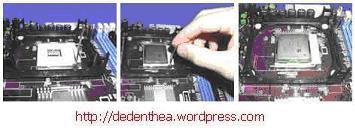
Prosessor lebih mudah dipasang sebelum motherboard menempati casing. Cara memasang prosessor jenis socket dan slot berbeda.Jenis socket
  1. Tentukan posisi pin 1 pada prosessor dan socket prosessor di motherboard, umumnya terletak di pojok yang ditandai dengan titik, segitiga atau lekukan.
  2. Tegakkan posisi tuas pengunci socket untuk membuka.
  3. Masukkan prosessor ke socket dengan lebih dulu menyelaraskan posisi kaki-kaki prosessor dengan lubang socket. rapatkan hingga tidak terdapat celah antara prosessor dengan socket.
  4. Turunkan kembali tuas pengunci.
rakit5.jpg
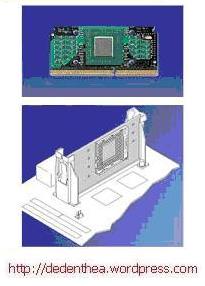
Jenis Slot
  1. Pasang penyangga (bracket) pada dua ujung slot di motherboard sehingga posisi lubang pasak bertemu dengan lubang di motherboard
  2. Masukkan pasak kemudian pengunci pasak pada lubang pasak
Selipkan card prosessor di antara kedua penahan dan tekan hingga tepat masuk ke lubang slot.
rakit6.jpg
3. Memasang Heatsink
Fungsi heatsink adalah membuang panas yang dihasilkan oleh prosessor lewat konduksi panas dari prosessor ke heatsink.Untuk mengoptimalkan pemindahan panas maka heatsink harus dipasang rapat pada bagian atas prosessor dengan beberapa clip sebagai penahan sedangkan permukaan kontak pada heatsink dilapisi gen penghantar panas.Bila heatsink dilengkapi dengan fan maka konektor power pada fan dihubungkan ke konektor fan pada motherboard.  
rakit16.jpg
........................

4. Memasang Modul Memori
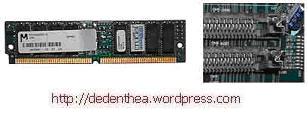
Modul memori umumnya dipasang berurutan dari nomor socket terkecil. Urutan pemasangan dapat dilihat dari diagram motherboard.Setiap jenis modul memori yakni SIMM, DIMM dan RIMM dapat dibedakan dengan posisi lekukan pada sisi dan bawah pada modul.Cara memasang untuk tiap jenis modul memori sebagai berikut.
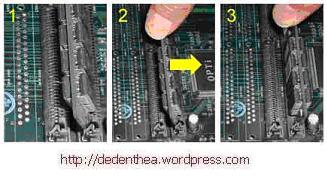
Jenis SIMM
  1. Sesuaikan posisi lekukan pada modul dengan tonjolan pada slot.
  2. Masukkan modul dengan membuat sudut miring 45 derajat terhadap slot
  3. Dorong hingga modul tegak pada slot, tuas pengunci pada slot akan otomatis mengunci modul.
rakit7.jpg
rakit8.jpg
Jenis DIMM dan RIMM
Cara memasang modul DIMM dan RIMM sama dan hanya ada satu cara sehingga tidak akan terbalik karena ada dua lekukan sebagai panduan. Perbedaanya DIMM dan RIMM pada posisi lekukan
  1. Rebahkan kait pengunci pada ujung slot
  2. sesuaikan posisi lekukan pada konektor modul dengan tonjolan pada slot. lalu masukkan modul ke slot.
  3. Kait pengunci secara otomatis mengunci modul pada slot bila modul sudah tepat terpasang.
 
rakit9.jpg
rakit10.jpg
  5. Memasang Motherboard pada Casing
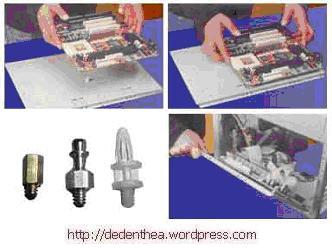
Motherboard dipasang ke casing dengan sekerup dan dudukan (standoff). Cara pemasangannya sebagai berikut:
  1. Tentukan posisi lubang untuk setiap dudukan plastik dan logam. Lubang untuk dudukan logam (metal spacer) ditandai dengan cincin pada tepi lubang.
  2. Pasang dudukan logam atau plastik pada tray casing sesuai dengan posisi setiap lubang dudukan yang sesuai pada motherboard.
  3. Tempatkan motherboard pada tray casing sehinga kepala dudukan keluar dari lubang pada motherboard. Pasang sekerup pengunci pada setiap dudukan logam.
  4. Pasang bingkai port I/O (I/O sheild) pada motherboard jika ada.
  5. Pasang tray casing yang sudah terpasang motherboard pada casing dan kunci dengan sekerup.
  
rakit11.jpg
  6. Memasang Power Supply
Beberapa jenis casing sudah dilengkapi power supply. Bila power supply belum disertakan maka cara pemasangannya sebagai berikut:
  1. Masukkan power supply pada rak di bagian belakang casing. Pasang ke empat buah sekerup pengunci.
  2. HUbungkan konektor power dari power supply ke motherboard. Konektor power jenis ATX hanya memiliki satu cara pemasangan sehingga tidak akan terbalik. Untuk jenis non ATX dengan dua konektor yang terpisah maka kabel-kabel ground warna hitam harus ditempatkan bersisian dan dipasang pada bagian tengah dari konektor power motherboard. Hubungkan kabel daya untuk fan, jika memakai fan untuk pendingin CPU.
rakit12.jpg
7. Memasang Kabel Motherboard dan Casing
Setelah motherboard terpasang di casing langkah selanjutnya adalah memasang kabel I/O pada motherboard dan panel dengan casing.
  1. Pasang kabel data untuk floppy drive pada konektor pengontrol floppy di motherboard
  2. Pasang kabel IDE untuk pada konektor IDE primary dan secondary pada motherboard.
  3. Untuk motherboard non ATX. Pasang kabel port serial dan pararel pada konektor di motherboard. Perhatikan posisi pin 1 untuk memasang.
  4. Pada bagian belakang casing terdapat lubang untuk memasang port tambahan jenis non slot. Buka sekerup pengunci pelat tertutup lubang port lalumasukkan port konektor yang ingin dipasang dan pasang sekerup kembali.
  5. Bila port mouse belum tersedia di belakang casing maka card konektor mouse harus dipasang lalu dihubungkan dengan konektor mouse pada motherboard.
  6. Hubungan kabel konektor dari switch di panel depan casing, LED, speaker internal dan port yang terpasang di depan casing bila ada ke motherboard. Periksa diagram motherboard untuk mencari lokasi konektor yang tepat.

kumpulan software

KUMPULAN SOFTWARE TERBARU

Posted by bambang purnomo aji - PKL - SIC On 23:49 0 komentar


Adobe Systems Inc - 14.45MB (Freeware)
The Adobe® AIR, runtime enables you to have your favorite web applications with you all the time. Since applications built for Adobe AIR run on your d...

Avant Force - 3.24MB (Freeware)
Avant Browser is a standalone application designed to expand features provided by Internet Explorer. It adds a bunch of features and functionalities t...

Comodo - 22.53MB (Freeware)
Comodo Dragon is a Chromium technology-based Browser that offers you all of Chrome's features PLUS the unparalleled level of security and privacy you ...

Mozilla Organization - 14.61MB (Open Source)
The Web is all about innovation, and Firefox sets the pace with dozens of new features to deliver a faster, more secure and customizable Web browsing ...

Adobe Systems Inc - (Freeware)
Adobe Flash Player is the high performance, lightweight, highly expressive client runtime that delivers powerful and consistent user experiences acros...

Flock - 10.95MB (Freeware)
Flock delivers the latest webmail, photos, videos and updates from your favorites sites, so you can stop running around. Take a load off. Enjoy.

Google - 22.98MB (Open Source)
Google Chrome is a browser that combines a minimal design with sophisticated technology to make the web faster, safer, and easier.

Google - (Freeware)
Keep the power of Google search close at hand. Google Toolbar puts a search box in your browser, making it easier than ever to find anything you want ...

Google - 1.55MB (Freeware)
Google Web Accelerator is an application that uses the power of Google's global computer network to make web pages load faster. Google Web Accelerator...

Microsoft Corporation - (Freeware)
Internet Explorer is the world's most popular Web browser. Security, ease of use, and improvements in RSS, CSS, and Ajax support are Microsoft's prior...

Oracle - (Freeware)
Java software allows you to run applications called "applets" that are written in the Java programming language. These applets allow you to have a muc...

K-Meleon - 5.77MB (Open Source)
K-Meleon is an extremely fast, customizable, lightweight web browser based on the Gecko layout engine developed by Mozilla which is also used by Firef...

Maxthon International Ltd - 25.09MB (Freeware)
Maxthon Internet Browser software is a powerful tabbed browser with a highly customizable interface. It is based on the Internet Explorer browser engi...

Netscape - 5.78MB (Freeware)
AOL stopped development of the Netscape browser in February 2008 so is no longer officially supported.

Opera Software - 9.83MB (Freeware)
A full-featured Internet browser, Opera includes pop-up blocking, tabbed browsing, integrated searches, and advanced functions like Opera's groundbrea...

Apple Inc - 36.51MB (Freeware)
At one time, web browsers simply got you to the Internet. But from the day it was released, Safari set the bar higher for web browsers. It introduced ...

Mozilla Organization - 16.92MB (Freeware)
SeaMonkey is a web-browser, advanced e-mail and newsgroup client, IRC chat client, and HTML editing made simple -- all your Internet needs in one appl...

Adobe Systems Inc - 11.78MB (Freeware)
Shockwave Player is the web standard for powerful multimedia playback. The Shockwave Player allows you to view interactive web content like games, bus...

Microsoft Corporation - 5.99MB (Freeware)
Microsoft Silverlight is a programmable web browser plugin that enables features such as animation, vector graphics and audio-video playback so you ca...
Emsi Software - 82.40MB (Freeware)
Security must not be a privilege. Under this motto, Emsi Software provides the Malware scanner a-squared Free completely free of charge for private us...

Lavasoft - 120.77MB (Non-Commercial Freeware)
Ad-Aware gives you comprehensive malware protection. With real-time monitoring, threat alerts, and automatic updates you can rest easy knowing that yo...

Avira GmbH - 79.60MB (Non-Commercial Freeware)
Avira AntiVir Personal - FREE Antivirus is a reliable free antivirus solution, that constantly and rapidly scans your computer for malicious programs ...

Avast Software - 56.22MB (Non-Commercial Freeware)
avast! Free Antivirus represents the best free antivirus protection currently available on the market. This edition is FREE OF CHARGE for non-commerci...

AVG Technologies - 11.84MB (Shareware)
AVG Anti-Spyware offers protection against urgently growing threats like Trojans, Worms, Dialers, Hijackers, Spyware and Keyloggers.

AVG Technologies - (Freeware)
AVG Anti-Virus Free Edition is trusted antivirus and antispyware protection for Windows available to download for free. In addition, the new included ...

BitDefender.com - 21.08MB (Freeware)
BitDefender Free Edition is your chance to use one of the world's most effective antivirus engines for free!

ClamWin - 38.85MB (Open Source)
ClamWin is a Free Antivirus program for Microsoft Windows 98/Me/2000/XP/2003 and Vista. ClamWin Free Antivirus comes with an easy installer and open ...

Panda Security - 33.08MB (Freeware)
Panda Cloud Antivirus protects you while you browse, play or work and you won't even notice it. It is extremely light as all the work is done in the c...

Trend Micro Inc - 520KB (Freeware)
Trend Micro CWShredder is the premier tool to find and remove traces of CoolWebSearch - the name for a wide range of insidious browser hijackers - fro...

Emsi Software - 97.21MB (Commercial Trial)
Emsisoft Anti-Malware monitors all active programs in real time for dangerous behavior (Behavior Blocking) and can detect new unknown Trojans, Worms, ...

Trend Micro Inc - 1.34MB (Freeware)
HijackThis inspects your computers browser and operating system settings to generate a log file of the current state of your computer. Using HijackThi...

Immunet Corporation - 453KB (Freeware)
Immunet provides essential antivirus protection for PC users. Immunet provides extra antivirus protection that is light, fast and compatible with exis...

Kaspersky - 68.38MB (Commercial Trial)
Kaspersky anti-virus protects you from the Phishing and Malware sites that you wouldn't otherwise know were attempting to steal from you.

Malwarebytes - 9.40MB (Shareware)
Malwarebytes' Anti-Malware can detect and remove malware that even the most well known anti-virus and anti-malware applications fail to detect. Malwar...

McAfee - 9.54MB (Commercial Trial)
Proven security that protects against viruses and spyware

Microsoft Corporation - (Freeware)
Microsoft Security Essentials provides real-time protection for your home PC that guards against viruses, spyware, and other malicious software.
PepiMK Software - 45.17MB (Freeware)
Spybot - Search & Destroy detects and removes spyware, a relatively new kind of threat not yet covered by common anti-virus applications. Spyware sile...

Spyware Terminator - 743KB (Freeware)
Millions of users worldwide rely on Spyware Terminator, winner of many awards and high ratings from industry experts and users. Its free comprehensive...

Javacool Software - 3.05MB (Non-Commercial Freeware)
Spyware, adware, browser hijackers, and dialers are some of the fastest-growing threats on the Internet today. By simply browsing to a web page, you c...

SUPERAntiSpyware - 12.24MB (Freeware)
SUPERAntiSpyware Professional features our highly advanced Real-Time Protection to ensure protection from installation or re-installation of potential...

Microsoft Corporation - 4.95MB (Freeware)
Windows Defender is software that helps protect your computer against pop-ups, slow performance, and security threats caused by spyware and other unwa...

BillP Studios - 803KB (Freeware)
WinPatrol alerts you to hijackings, malware attacks and critical changes made to your computer without your permission. As a multipurpose support util...

Adobe Systems Inc - 2.41MB (Freeware)
Adobe Media Player is a next-generation desktop media player, providing high-quality video playback of streamed, downloaded, or locally stored video c...

AIMP - 7.61MB (Freeware)
AIMP is a free audio player with support for large number of formats and playlists. It works with multiple playlists immediately, allows creation of b...

ALLCinema sp. z o.o. - 22.87MB (Freeware)
ALLPlayer is probably the most popular program for watching movies with matching subtitles. It plays all known media formats, RAR files, and futhermor...

AVC - 23.39MB (Freeware)
Any Video Converter is an All-in-One video converting tool with easy-to-use graphical interface, fast converting speed and excellent video quality. It...

Audacity Development Team - 13.85MB (Open Source)
Audacity is a free, easy-to-use audio editor and recorder for Windows, Mac OS X, GNU/Linux and other operating systems. You can use Audacity to:

Audiograbber - 1.59MB (Freeware)
Audiograbber grabs digital audio from cd's. It copies the audio digitally -- not through the soundcard -- which enables you to make perfect copies of ...


MusicPlaylistView Profile
Create a playlist at MixPod.com

al'quran